Key features
- Bug-for-bug vanilla accuracy — reproduces the original DOS Doom executable’s behavior, including rendering limits and demo sync.
- Full demo compatibility — demos recorded in Chocolate Doom play back correctly in the original DOS binary and vice versa.
- Multi-game suite — ships separate executables for Doom, Heretic, Hexen, and Strife, each targeting its respective original binary.
- Freedoom IWAD support — officially supports Freedoom, playable in both single-player and multiplayer, which were updated to be vanilla-compatible.
- Modern network protocol with vanilla behavior — replaces vanilla's IPX/serial networking with a client/server model over UDP/IP, while preserving the original lockstep synchronization for co-op and deathmatch.
- Compatible configuration files — reads and writes
default.cfgin the same format as the DOS executable, enabling file exchange with DOSBox installs. - Text-mode setup utility — includes
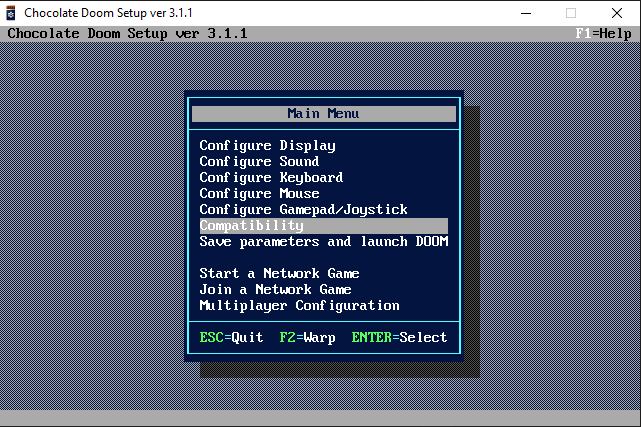
chocolate-setup, a setup tool styled after the original DOS Doom setup program for configuring network games and key bindings. - GPL-2.0 open source — full source code available on GitHub; buildable on platforms beyond the official binary targets.
What is Chocolate Doom?
Chocolate Doom occupies a singular position in the Doom source-port landscape: it is not designed to push the game forward but to reproduce it with painstaking fidelity. Where most source ports treat vanilla Doom as a starting line, Chocolate Doom treats it as the destination. Every quirk, every original rendering limit, every bug-for-bug behavior that id Software shipped in 1993 is considered a feature to be preserved rather than a defect to be patched. The result is a port that functions as a living reference implementation of the DOS executable — runnable on modern operating systems without requiring DOSBox.
Origins and Philosophy
Chocolate Doom was started in 2005 by Simon Howard, known online as Fraggle, who remains the project’s principal maintainer. The founding premise was straightforward but demanding: produce a source port whose behavior is demonstrably indistinguishable from the original DOS Doom, Doom II, and their associated engine variants. That goal shapes every design decision the project has made in the two decades since. Feature requests that would break demo compatibility or alter gameplay behavior are declined regardless of their merits in isolation. The philosophy is that if a player records a demo under Chocolate Doom and feeds that demo back to the original DOS binary, it must sync — and vice versa.
This strict fidelity stance made Chocolate Doom the canonical tool for the competitive Doom speed-running community during the period when the community standardized on vanilla-compatible demos. It also made it the most common recommendation for players who want to experience the original game as its authors intended without the overhead of a full DOS emulation layer.
Scope: More Than Doom
Although the project bears the Doom name, its scope covers the full id Software engine family of the era. Chocolate Doom ships as a suite of separate executables, each targeting a different game:
- chocolate-doom — Doom, Doom II, Final Doom, and compatible IWADs including Freedoom.
- chocolate-heretic — Heretic, Raven Software’s 1994 fantasy shooter built on a modified Doom engine.
- chocolate-hexen — Hexen: Beyond Heretic, which introduced the hub-based level structure and ACS scripting.
- chocolate-strife — Strife: Quest for the Sigil, the 1996 RPG-hybrid built on the Doom engine. Chocolate Strife was developed by James Haley and Samuel Villarreal, who reverse-engineered the entire game from the original DOS binary executables in cooperation with the original Strife developers.
Each executable is maintained with the same fidelity commitment applied to its respective original binary, making the Chocolate Doom project effectively a vanilla preservation suite rather than a single-game port.
Vanilla Accuracy in Practice
Vanilla accuracy means Chocolate Doom deliberately preserves behaviors that other ports eliminate. The original Doom renderer imposed hard limits on the number of draw segments and visplanes it could process in a single frame — exceeding those limits caused the game to crash or produce visual glitches. Chocolate Doom enforces those same limits, which means that a map designed to trigger visplane overflow in DOS Doom will also fail in Chocolate Doom. This is not an oversight; it is a deliberate reproduction of the original behavior. Players who want those limits removed while retaining the general look and feel of vanilla Doom should try Crispy Doom—a limit-removing fork built directly on the Chocolate Doom codebase.
Configuration files are another area of strict compatibility. Chocolate Doom reads and writes default.cfg in the same format as the original DOS executable, meaning configuration files can be exchanged between Chocolate Doom and a DOSBox-hosted DOS binary without modification. The same applies to save files and demo recordings: demos recorded in Chocolate Doom play back correctly in the original game and vice versa. This two-way interoperability is the most concrete expression of what “vanilla accuracy” means in practical terms.
The port also reproduces the original multiplayer experience, though it requires adapting the underlying tech for modern networks. While vanilla Doom relied on now-obsolete 1990s IPX network packets and serial cables, Chocolate Doom abstracts this by implementing a modern client/server model over UDP/IP. It translates the original latency sensitivity, and cooperative or deathmatch modes to modern internet and LAN environments. A dedicated setup tool, chocolate-setup, ships alongside the executables to configure these network games and key bindings through a text-mode interface styled after the original DOS setup utility.
Platform Support
Chocolate Doom provides official, pre-compiled binaries directly for Windows. While macOS packages were historically distributed by the project team, ongoing complexities with Apple’s developer notarization process mean modern Mac users are now generally directed to community-maintained repositories, Homebrew, or dedicated preservation sites like Mac Source Ports. Linux and BSD users are served through native distribution packages rather than official binaries from the project team; most major distributions carry Chocolate Doom directly in their package managers. Source code is available on GitHub for anyone who needs to build for an unsupported platform.
IWAD Requirements
Chocolate Doom, like all Doom-engine ports, requires an IWAD — the main game data file containing levels, graphics, music, and sound effects. For Doom and Doom II this means the commercial DOOM.WAD or DOOM2.WAD files. Players who do not own the original games can use the Freedoom IWAD files, which the project explicitly supports; recent versions of Freedoom made all levels vanilla-compatible, allowing them to work correctly under Chocolate Doom’s strict engine. The FAQ on the official wiki walks through where to place the IWAD and how the port locates it at runtime.
The Chocorenderlimits Fork
One interesting branch of the project’s history is Chocorenderlimits, a fork of Chocolate Doom that adds an on-screen display showing real-time information about vanilla Doom’s rendering limits as a level is played. It was developed as a diagnostic tool for map authors who want to verify that their levels remain within vanilla compatibility bounds. While it is a separate program rather than a feature of the main port, it illustrates how Chocolate Doom’s accuracy serves the broader community of WAD authors and demo runners, not just players.
Relationship to Crispy Doom
The most prominent derivative of Chocolate Doom is Crispy Doom, maintained by Fabian Greffrath, who is also a co-developer of Chocolate Doom itself. Crispy Doom takes the Chocolate Doom codebase and removes the original engine’s rendering limits while adding a higher internal resolution (640×400) and a small set of optional quality-of-life features. It occupies the niche between vanilla-accurate play and full-featured modern ports: the gameplay logic, demo compatibility, and general aesthetic remain faithful to vanilla Doom, but maps that would crash the original engine due to limit overflows run without issue. Crispy Doom inherits its stability and accuracy directly from the Chocolate Doom foundation.
This relationship is worth understanding for players deciding which port to use. Chocolate Doom is the correct choice when absolute behavioral fidelity to the 1993 DOS executable is the goal — for demo recording and playback verification, for experiencing bugs and limitations as original players did, or for running maps specifically designed for the vanilla engine. Crispy Doom is the appropriate upgrade path when those limits become obstacles without wanting to move to a fully modern port.
Development and Maintenance
The project is hosted on GitHub and has been under continuous development since 2005. Version 3.1.1, published in August 2025, represents the current stable release. The developer roster over the years has included Simon Howard as the founding developer and lead maintainer, Fabian Greffrath as a significant co-contributor, and a range of community contributors who have supplied patches, bug reports, and documentation. The AUTHORS file in the repository lists James Haley, Samuel Villarreal, Jonathan Dowland, and many others alongside the core contributors.
Development activity has historically been steady rather than rapid, which reflects the port’s nature: there are no new features to ship in a port whose goal is fidelity to a fixed target. Releases tend to address platform compatibility issues, build system improvements, edge-case accuracy fixes, and support for new platforms or toolchains. The project wiki provides a development page for tracking ongoing work and accessing the latest builds directly from the repository.
Why Chocolate Doom Matters
The value of Chocolate Doom is partly historical and partly practical. Historically, it demonstrates that the original Doom executable’s behavior can be reproduced completely enough to pass a full demo-sync test — a form of verification that forces the reimplementation to match the original at the level of game logic, not just visual output. This was a significant engineering effort when the project was started, and the work produced a reference against which other ports can measure their own compatibility.
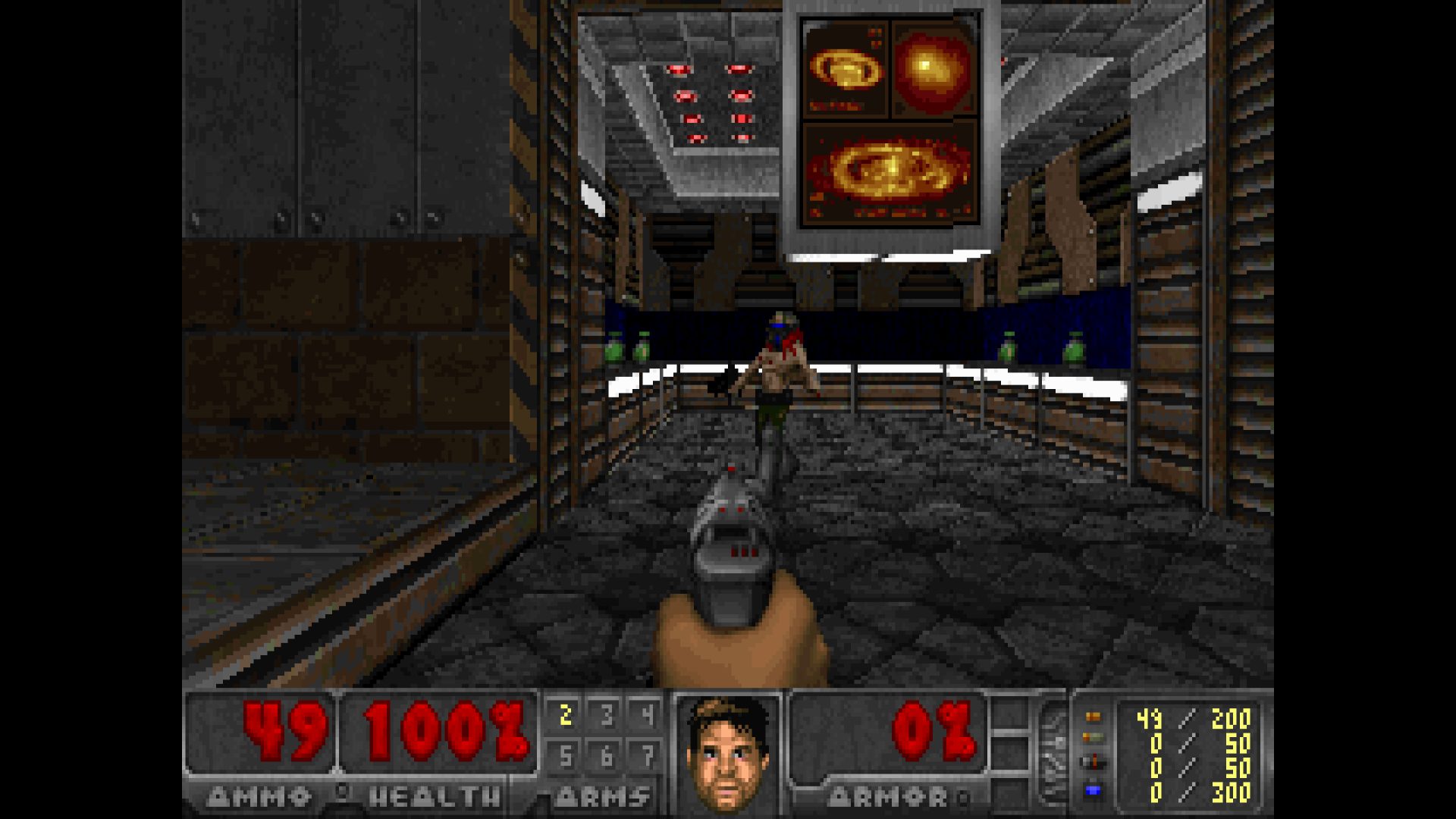
Practically, Chocolate Doom provides a zero-compromise way to run classic Doom-engine games on contemporary operating systems. Players who know they want the original experience — including the original screen resolution of 320×200, the original sound system behavior, and the original network protocol — have a single, maintained, open-source tool that delivers exactly that without requiring configuration to “turn off” enhancements. Every feature modern ports add is a feature Chocolate Doom has deliberately not added.
For WAD authors targeting vanilla compatibility, Chocolate Doom functions as a testing environment. A map that works correctly in Chocolate Doom is very likely to work correctly on the original DOS executable. The Chocorenderlimits fork extends this use case by surfacing limit information during play. No other source port offers this combination of accuracy and accessibility for vanilla-targeted development work.
The port is also the foundation on which a generation of more featureful ports was built. Crispy Doom’s direct derivation from Chocolate Doom means that its stability and accuracy are inherited rather than independently achieved. The Chocolate Doom codebase has served as a clean, well-documented reference for developers working on new ports and forks, and the project’s open development process on GitHub has made that code accessible to anyone who wants to study how the original engine actually worked.
Getting Started
The official website at chocolate-doom.org hosts downloads, a wiki with setup instructions, and documentation covering the FAQ, configuration file format, and network play setup. The Downloads page links to the current release binary for Windows, release notes, and instructions for Linux users to locate their distribution’s package. The FAQ page on the wiki covers the most common setup questions, including IWAD location, command-line parameters, and compatibility with PWADs.
For players coming to Chocolate Doom from a modern port, the transition requires setting aside the expectation of conveniences like widescreen support, freelook, and high resolutions. Those features are absent by design. What remains is a clean, accurate, and historically significant implementation of one of the most influential games ever made — running natively on your current operating system, without emulation, with full demo compatibility, and with the rendering limits that made vanilla Doom maps a creative constraint and a craft tradition.
How to install Chocolate Doom
// From zero to playing — step by stepDownload Chocolate Doom
Visit the Downloads page on the official Chocolate Doom wiki. Windows users can download a pre-compiled binary directly. Linux and BSD users should install the package available in their distribution’s repositories. macOS users can still run Chocolate Doom via Homebrew, MacPorts and Mac Source Ports.
Obtain an IWAD file
Chocolate Doom requires an IWAD — the main game data file. For Doom this is DOOM.WAD or DOOM2.WAD from the commercial release. Freedoom’s IWAD files are also officially supported as a free alternative. Place the IWAD in the same directory as the Chocolate Doom executable or in a location the port will search automatically. The FAQ documents where Chocolate Doom looks for IWADs on each platform.
Run the executable
Launch the appropriate executable for your game (for Doom, run chocolate-doom). On Windows, double-clicking the binary will start the game if a compatible IWAD is found. Additional command-line parameters and configuration options are documented in the wiki.
Configure with chocolate-setup
Run chocolate-setup to configure key bindings, display options, and network game settings through a text-mode interface styled after the original DOS Doom setup utility. Settings are saved to default.cfg in the same format as the original executable.
Chocolate Doom system requirements
Frequently asked questions
Does Chocolate Doom require the commercial Doom game files?
Yes, an IWAD file is required. This can be the commercial DOOM.WAD or DOOM2.WAD, or the free Freedoom IWAD files, which are officially supported since they were updated to be vanilla-compatible. The FAQ explains where to obtain and place IWAD files.
Does Chocolate Doom run on Linux?
Yes. While the project does not distribute official Linux binaries, Chocolate Doom is packaged in most Linux and BSD distributions and can be installed through the system package manager. It can also be compiled from source using the code on GitHub.
Why does Chocolate Doom crash on some maps that work in other ports?
Chocolate Doom deliberately enforces the rendering limits of the original DOS executable, including limits on draw segments and visplanes. Maps that exceed those limits will behave exactly as they would in the original game — which may mean a crash or visual glitch. If you want to run maps that exceed vanilla limits while keeping the general vanilla feel, Crispy Doom, a limit-removing fork of Chocolate Doom, is the appropriate alternative.
Which games does Chocolate Doom support beyond Doom and Doom II?
The Chocolate Doom suite includes separate executables for Heretic, Hexen, and Strife, each targeting the original binary for that game with the same fidelity commitment applied to Doom. Chocolate Strife was developed in cooperation with the original Strife developers.
Are demos recorded in Chocolate Doom compatible with the original DOS game?
Yes. Demo compatibility with the original DOS executable is one of the project’s primary design goals. Demos recorded in Chocolate Doom should play back correctly in the DOS binary and vice versa, provided the same IWAD and PWADs are used.
What is the current version of Chocolate Doom?
The current stable release is version 3.1.1, published on 2025-08-14. Release notes and download links are available on the Downloads page and the GitHub releases page.
How is Chocolate Doom different from Crispy Doom?
Crispy Doom is a fork of Chocolate Doom that removes the original engine’s rendering limits and adds a higher internal resolution (640×400) along with optional quality-of-life features. Chocolate Doom preserves those limits exactly as they existed in the DOS executable. Choose Chocolate Doom for strict vanilla accuracy; choose Crispy Doom if you want limit-removing behavior while staying close to the vanilla experience.
Sources
- EXT About - Chocolate Doom www.chocolate-doom.org
- EXT Chocolate Doom - The Doom Wiki doomwiki.org
- EXT Downloads - Chocolate Doom www.chocolate-doom.org
- EXT FAQ - Chocolate Doom www.chocolate-doom.org
- EXT Chocolate Doom 3.1.1 Release - GitHub github.com