Key features
- Multiplayer-first architecture with dedicated server support inherited from Skulltag
- Compatible with Skulltag mods — the full legacy multiplayer WAD library runs without modification
- Extended game modes including capture the flag, invasion, last man standing, and possession
- Runes and additional weapons beyond the standard Doom II arsenal carried over from Skulltag (delivered through the Skulltag compatibility content rather than bundled in the base engine)
- Announcer and player skin support for online play
- Full support for Heretic, Hexen, and Strife in addition to Doom and Doom II
- ZDoom-derived codebase — the 3.0 development builds shipped on the GZDoom 1.8.6 code base, with later 3.x releases (3.1, 3.2, 3.2.1) building on that foundation
- Runs on Windows, macOS, and Linux
What is Zandronum?
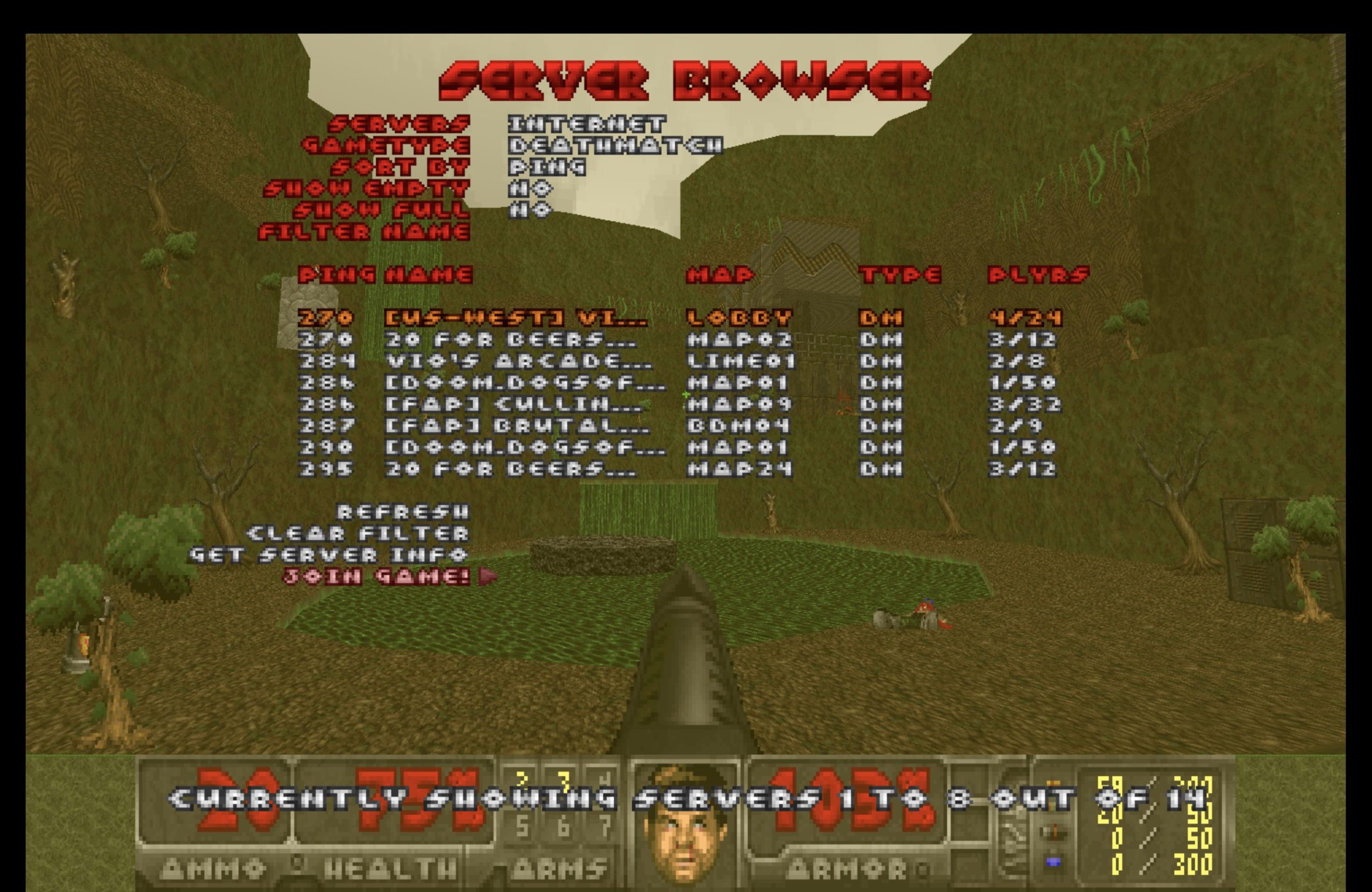
Zandronum is one of the easiest ways to discover just how far Doom’s multiplayer scene extends beyond the original game. Its bundled Doomseeker client puts you in front of a large, active list of global servers, while the port carries forward Skulltag’s extensive library of capture-the-flag maps, Invasion, custom weapons, and other multiplayer content. It’s the most populated multiplayer scene of any port we tested, and most servers still require a commercial doom2.wad, so you’ll need your own game data before jumping in. However, there is one platform-specific wrinkle worth knowing: during our testing on macOS, Zandronum’s built-in server browser crashed immediately, making Doomseeker the more reliable way to find a game there. Even with that caveat, the combination of active servers and a deep library of multiplayer content makes Zandronum an especially approachable starting point for online Doom.
Origins: from Skulltag to Zandronum
Skulltag introduced a generation of Doom players to the idea that the classic engine could sustain dedicated servers, rankings, chat lobbies, and game modes that went far beyond the original game’s single-player campaign. When Zandronum emerged from that foundation, it inherited the full catalog of Skulltag-compatible mods — a substantial library built over many years by the community — and committed to maintaining that compatibility as a design constraint, not merely a convenience. This backward-compatibility promise is one of Zandronum’s most enduring assets: content created for Skulltag typically runs without modification inside Zandronum, which means the port arrived with a rich, tested mod ecosystem on day one.
The project’s canonical repository is hosted on Heptapod; TorrSamaho (who is officially the developer responsible for releases) also maintains a read-only Git mirror on GitHub for convenience. The project has navigated periods of slower activity, as is common with volunteer-maintained open-source ports, but official release cadence has continued into 2025.
ZDoom foundations and the 3.x generation
Zandronum is built atop a ZDoom-derived codebase, which gives it access to a substantial feature set beyond the vanilla Doom engine. The 3.0 development builds shipped with the GZDoom 1.8.6 code base, giving Zandronum a significant jump in feature parity with the ZDoom/GZDoom lineage of the time. The subsequent 3.1 release, announced after “more than four years in development,” was described by its author as bringing the port up to date after that long a gap — a milestone distinct from, but often conflated with, the earlier 3.0 codebase update. This is a meaningful lineage: the ZDoom heritage brought DECORATE scripting, ACS extensions, and a host of map-format improvements that multiplayer WAD authors could exploit to create custom game modes, new weapons, and server-side rule sets.
The 3.x generation of Zandronum has continued that trajectory. According to the Doom Wiki entry, version 3.2 was released on April 27, 2025, described by the development team as “the culmination of about three and a half years of effort,” with 3.2.1 following on August 4, 2025. Each release in this series has been a point-release maintenance update, addressing stability and compatibility concerns reported by the server and mod communities.
Multiplayer architecture and game modes
What sets Zandronum apart from general-purpose ports is the depth of its multiplayer infrastructure. The Doom Wiki and the project’s GitHub repository both describe a feature set that includes dedicated server support, runes and additional weapons carried over from Skulltag (now delivered through the Skulltag compatibility content rather than bundled in the base engine), announcers, and player skins — all oriented toward the online competitive and cooperative play experience. The announcer system, in particular, is a quality-of-life detail that distinguishes Zandronum from a simple Doom engine with networking bolted on: it gives matches a broadcast-sport feel that has been part of the Skulltag/Zandronum community culture for years.
Game modes in Zandronum extend the vanilla Doom deathmatch and cooperative templates significantly. The Skulltag inheritance brought invasion mode, capture the flag, possession, last man standing, and other structured modes to the Doom engine — modes that required not just networking code but custom map markers, scoreboards, and server-side game-state management. Zandronum preserves and extends all of these, making it the port of choice for communities that want a curated, mode-specific online experience rather than simple peer-to-peer connectivity.
Game compatibility: Doom, Heretic, Hexen, Strife, and more
Zandronum is not limited to the Doom and Doom II IWADs. The Doom Wiki documents full support for Heretic, Hexen, and Strife — the other id-Tech-1-lineage commercial titles that share enough engine DNA to run inside a ZDoom-based port. The project’s own community channels also list support for Final Doom and HacX alongside the core titles. This breadth means that community servers for Hexen co-op or Heretic deathmatch are possible using the same infrastructure as a standard Doom II session, though the majority of Zandronum’s active servers and mod content targets Doom and Doom II.
For a player launching Zandronum, the relevant IWAD requirement depends on the session they intend to join or host. A Doom II server requires doom2.wad; a Heretic server requires heretic.wad; and so on.
Platform support
Zandronum targets the three major desktop platforms: Windows, macOS, and Linux. The Doom Wiki page and the GitHub repository both confirm this, and current builds continue to be distributed for all three. For Linux users, Zandronum has also appeared in distribution repositories and Flatpak packaging, though the canonical release artifacts remain those distributed through the official site. Third-party ARM builds (e.g. the ptitSeb fork) extend unofficial reach further, though these are community-maintained and not official releases.
Skulltag mod compatibility as a community asset
One of the most concrete reasons players and server operators choose Zandronum over other multiplayer-capable ports is the promise of Skulltag mod compatibility. The Skulltag era produced a substantial body of multiplayer WADs — capture-the-flag arenas, invasion maps, deathmatch megawads, and mode-specific content — that relied on Skulltag-specific actors, weapons, and ACS extensions. Zandronum was designed from the outset to run this content, and the project description explicitly lists “compatible with Skulltag mods” as a headline feature. For server operators curating a classic multiplayer experience, this compatibility is not a minor convenience — it is the reason Zandronum exists as a distinct project rather than simply folding into a general-purpose modern port.
The Doomseeker companion
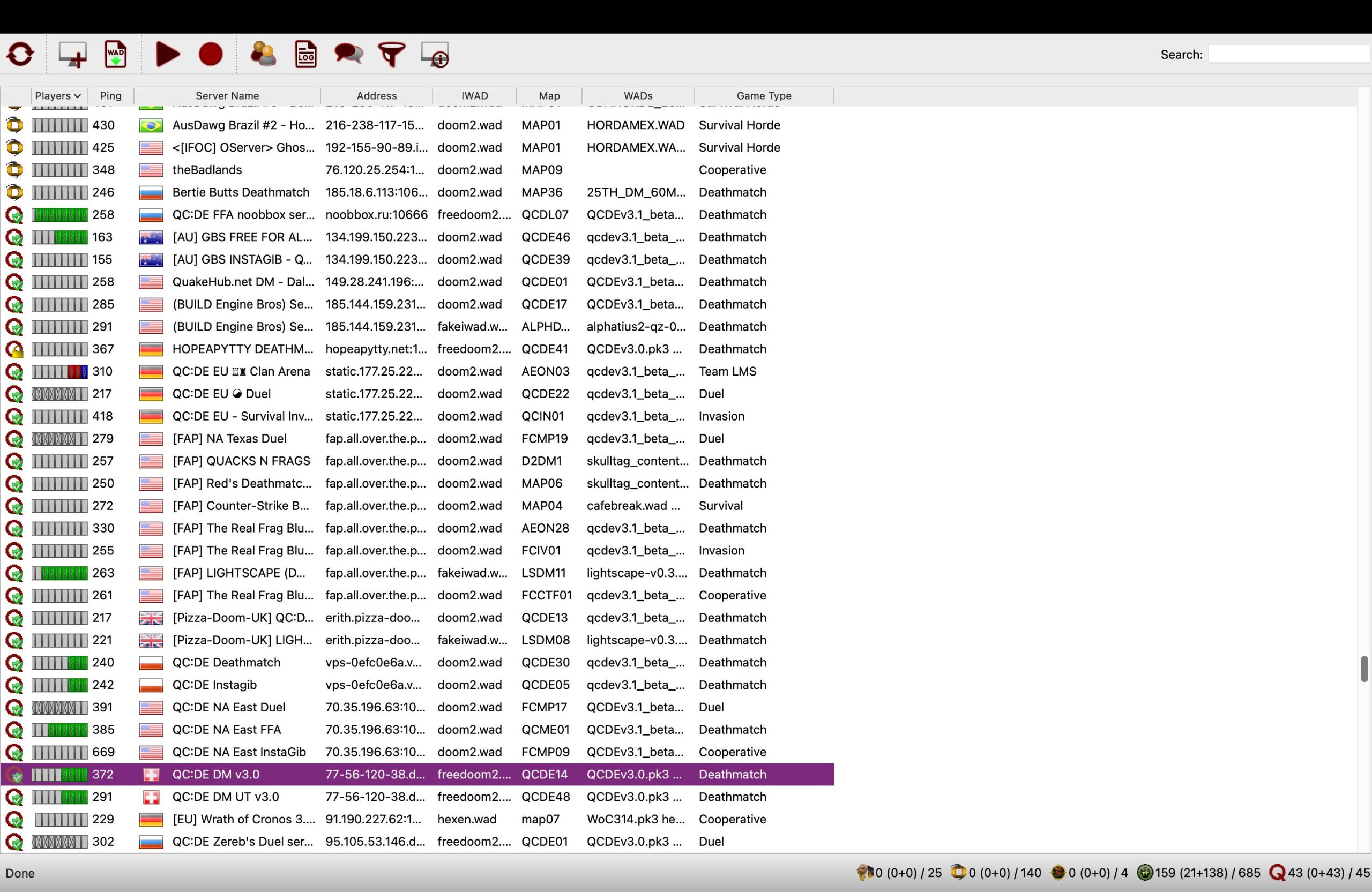
Zandronum is typically paired with Doomseeker, a dedicated server browser application that lists active Zandronum (and other compatible) servers, shows player counts, game modes, WAD requirements, and ping times. While Doomseeker is a separate project, the Zandronum ecosystem treats it as the practical entry point for online play. Players use Doomseeker to locate a server, verify they have the required WADs, and launch Zandronum pre-configured for that session. This separation of the browser from the engine reflects a design philosophy that keeps the core port lean while providing purpose-built tooling for the multiplayer discovery problem.
Licensing and source availability
The LICENSE.txt file in the upstream repository is the authoritative reference for Zandronum’s licensing terms. Like many Doom source ports, Zandronum’s license situation is composite: the original Doom engine source was released under the GNU GPL, while ZDoom and Skulltag introduced additional components and restrictions. New code written specifically for Zandronum is released under a custom four-clause license based on the OSI-approved, GPL-compatible Sleepycat License, with the addition of a “No Endorsement” clause borrowed from the 3-clause New BSD License. In practice, this means Zandronum’s source code is safe to use in either GPL-licensed or Doom Source License/Raven Source License-based ports, as long as the terms of the Zandronum-specific license are satisfied. Some individual source files retain their own original copyright notices from earlier contributors. Players and mod authors are advised to consult LICENSE.txt directly, and the ZDoom license page for background on the other licenses used within the codebase.
Development status and community outlook
Community discussion, including a notable forum thread on development activity, reflects the reality that Zandronum’s maintenance is carried by a small core of developers. Activity in the repository can go through quieter periods, which has led some community members to speculate about the port’s long-term trajectory. However, the release of version 3.2 in April 2025 and the follow-up 3.2.1 patch in August 2025 demonstrate that the project remains in active maintenance. For a port that serves a dedicated online community — one with servers running around the clock and a back-catalog of multiplayer WADs spanning more than fifteen years — continued maintenance rather than feature velocity is the more meaningful health metric.
The Zandronum community has also self-organized around its server infrastructure in ways that are somewhat independent of the port’s release cadence. Tournament leagues, community events, and curated server lists exist outside the port itself, sustained by players who have built their Doom multiplayer practice around the Skulltag/Zandronum ecosystem specifically. This community inertia is both a sign of health and a stabilizing force: even during slower development periods, the servers remain populated and the WAD library continues to be played.
Comparison with other multiplayer-capable ports
Players evaluating multiplayer options for Doom typically encounter Zandronum alongside Odamex, which takes a different philosophy — emphasizing demo-compatible, vanilla-accurate online play over the feature-rich Skulltag-derived approach. Zandronum and Odamex represent distinct design priorities: Zandronum prioritizes a rich multiplayer feature set and mod ecosystem; Odamex prioritizes vanilla fidelity and competitive accuracy in a purer sense. General-purpose modern ports such as GZDoom support multiplayer sessions, but their primary focus is single-player experience and rendering quality, whereas Zandronum treats the server infrastructure, game modes, and online tooling as the centerpiece of its design.
Getting started
For new users, the practical entry point is straightforward. Zandronum requires a commercial IWAD (typically doom2.wad for the majority of online servers) and the Zandronum executable for the relevant platform. Official builds for Windows, macOS, and Linux are distributed through the project’s official channels. Once installed, the accompanying Doomseeker is the recommended tool for discovering active servers, checking WAD requirements, and launching sessions. Players intending to host their own servers will find Zandronum’s dedicated server mode documented on the project forums and wiki.
For those with existing Skulltag mod libraries, migration to Zandronum is typically seamless: the compatibility promise means that WADs targeting Skulltag’s extended actor and weapon set will load and run as expected. This has made Zandronum the de-facto successor for communities that previously organized around Skulltag servers.
Related ports
Users interested in Zandronum’s single-player capabilities in a more feature-complete modern context may wish to explore GZDoom, which shares ZDoom lineage but is optimized for single-player and scripted mod experiences with hardware rendering. For competitive players seeking a vanilla-accurate online alternative, Odamex represents the other major multiplayer-focused port in the community.
How to install Zandronum
// From zero to playing — step by stepObtain a commercial IWAD
Zandronum requires a commercial IWAD such as doom2.wad for the majority of online servers, or the relevant IWAD for Heretic, Hexen, or Strife sessions. These are not included with Zandronum and must be sourced separately. Freedoom’s free IWADs also work if you don’t own the commercial games.
Download Zandronum for your platform
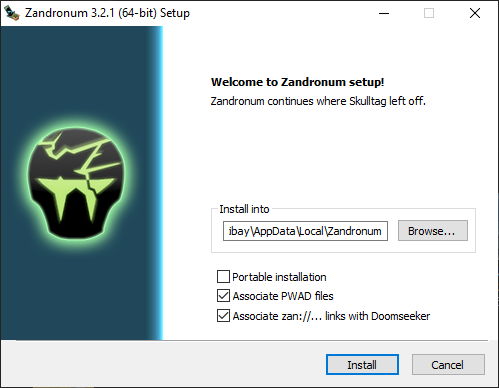
Official builds for Windows, macOS, and Linux are available through the Zandronum official site. Select the build appropriate for your operating system.
Install Doomseeker for server browsing
Doomseeker is the recommended companion application for discovering active Zandronum servers. It shows server lists, player counts, game modes, required WADs, and ping. When you download the Zandronum installer packages for Windows and macOS, they already come with the accompanying Doomseeker launcher.
Point Zandronum to your IWAD
On first launch, configure Zandronum’s IWAD path so it can locate your commercial game data. This is typically done through the launcher settings or by placing the IWAD in the same directory as the Zandronum executable.
Join a server via Doomseeker
Use Doomseeker to browse active servers, verify you have any required PWADs, and launch Zandronum pre-configured for that session. Missing PWADs can often be downloaded automatically via Doomseeker’s WAD fetching feature.

Zandronum system requirements
Zandronum vs other source ports
Need to pick between ports?
Short version: Zandronum handles most needs. For the full comparison and our ranked list, see the dedicated pages.
Frequently asked questions
Is Zandronum still actively developed?
Yes. Version 3.2 was released on April 27, 2025, and version 3.2.1 followed on August 04, 2025, according to the official release announcement, TorrSamaho is the developer officially responsible for releases. Development builds for the next version, 3.3, are ongoing, with alpha builds published as recently as January 2026.
Are Skulltag mods compatible with Zandronum?
Yes. Compatibility with Skulltag mods is an explicit design goal of Zandronum, as stated in the project repository. WADs built for Skulltag’s extended actor and weapon set typically run without modification.
Which games can Zandronum run besides Doom?
Zandronum supports Doom, Doom II, Heretic, Hexen, and Strife, as documented by the Doom Wiki, with Final Doom and HacX also listed as supported by the project’s own channels. The appropriate commercial IWAD is required for each game.
What is the difference between Zandronum and GZDoom?
Both share ZDoom lineage, but their priorities differ significantly. Zandronum is multiplayer-first, with dedicated server infrastructure, structured game modes, and Skulltag mod compatibility as headline features. GZDoom is optimized for single-player and scripted mod experiences with hardware rendering. Players wanting rich online play choose Zandronum; players wanting modern single-player visuals choose GZDoom.
Do I need Doomseeker to use Zandronum?
Doomseeker is not required to run Zandronum, but it is the community-standard tool for discovering active servers, checking WAD requirements, and launching sessions. Direct IP connection is also possible without it.
What platforms does Zandronum support?
Zandronum runs on Windows, macOS, and Linux, as confirmed by the Doom Wiki and the project repository.
Sources
- EXT Zandronum GitHub repository (TorrSamaho) github.com
- EXT Zandronum | Doom Wiki (doomwiki.org) doomwiki.org
- EXT Zandronum 3.2 announcement (zandronum.com forum) zandronum.com
- EXT Still in development? (zandronum.com forum) zandronum.com